You already use ChatGPT to reformat a CV or clean up a job description. Someone on your team subscribes to a sourcing tool that claims to be "AI-powered". And every week another LinkedIn post tells you AI is about to replace recruiters. This piece is for owners of small recruitment agencies (2-30 people) who want to know what saves hours in a firm your size, what wastes money, and where you'll hit a wall that ChatGPT plus Sales Nav can't fix.
Most of what I'll cover comes from building AI for a recruitment SaaS client for the past year and change - a job-monitoring agent that watches portals, filters roles by recruiter preferences, pulls candidates from Apollo, and pings the recruiter on WhatsApp. That client had zero in-house AI experience when we started. Some of it comes from a discovery call I had with a Korean recruitment firm already paying for Claude Max and asking the same question you probably are - how to build an automation process, especially in sourcing candidates.
What AI is good at in a recruitment agency today
The wins are boring and repeat. If your day has a task you do 30+ times a week that involves reading text, writing text, or moving data between tools, AI is probably the right tool for at least part of it.
Reformatting CVs and JDs
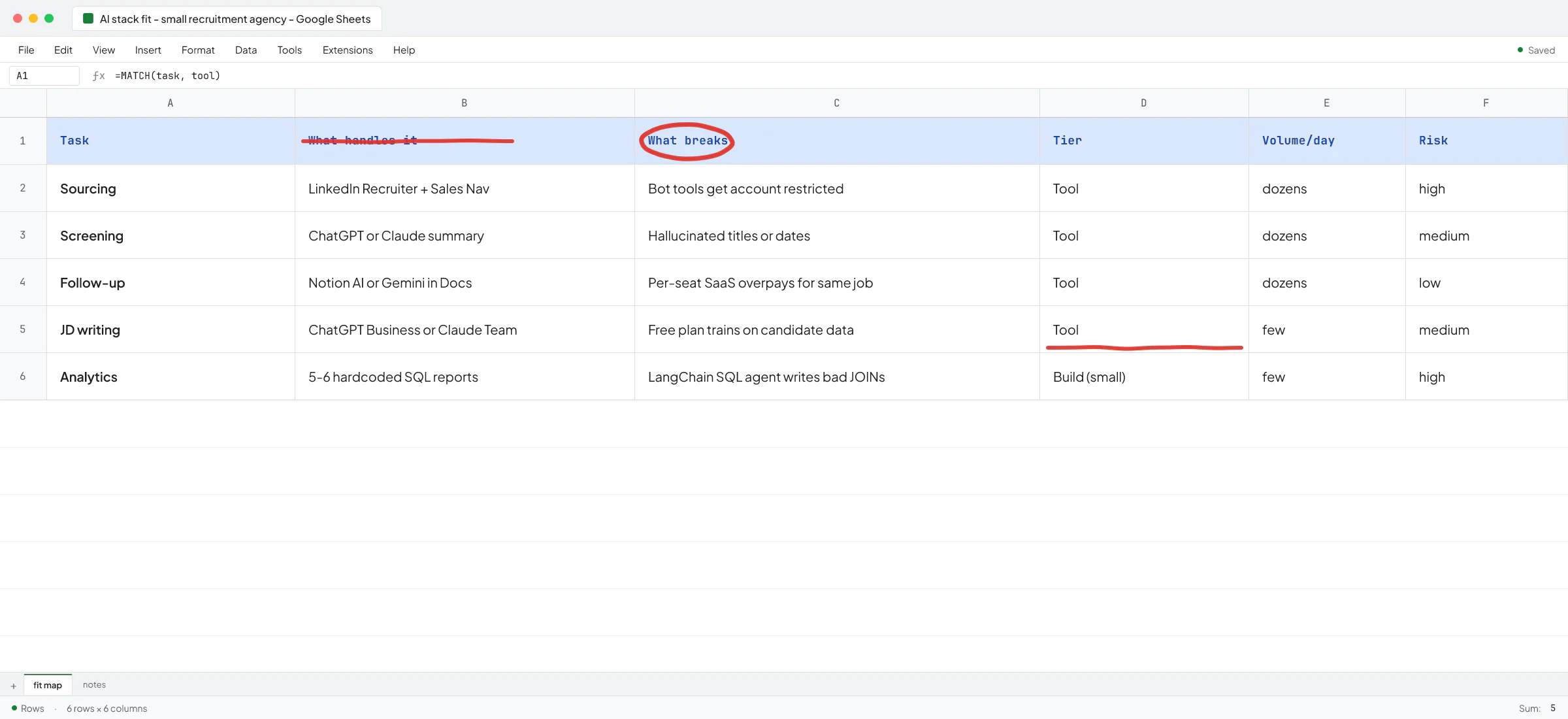
This is what most recruiters try first. It works. A prompt in ChatGPT or Claude that says "reformat this CV into our house template, keep dates and titles exact, no fabrication" gets you 80-90% of the way there. Every recruiter I've talked to who tried this said it saved real hours in week one.
The trap: candidates and clients care that dates, employer names, and titles are exact. Modern models hallucinate less than they did two years ago, but they still occasionally invent a job title that sounds plausible. Any CV going to a client needs a human pass. Any JD going into the market too. This isn't a reason to skip AI - it's a reason to keep the recruiter in the loop for the last mile.
For sensitive candidate data on the free ChatGPT plan, note that conversations get used for training unless you turn that off. On ChatGPT Business, Enterprise, and Team plans that's off by default. If you deal with candidates under an NDA (executive search, medical, defense), you want at least the Team plan for anyone touching real names.
Long-form generation of standardized content
I did a project for Ove André Remme, founder of Terapivakten in Norway, that isn't recruitment but rhymes with it - a course-builder that generates 10,000-word Norwegian lessons from a short business brief. Before hiring me, he'd worked with another Upwork freelancer who spent two weeks building a custom GPT that only generated about 60% of the needed content. When the client asked it to write more, it produced unnatural filler.
"You were directly pointing to the issue that I experienced," Ove said in his video testimonial.
The lesson for recruitment: when the output has to be long, structured, and on-tone (candidate outreach sequences in your firm's voice, market maps for a client, weekly BD summaries), a custom GPT often isn't enough. It needs a real pipeline that breaks the work into steps, checks its own output, and re-runs the weak parts. More on that further down.
Follow-up drafting and inbox triage
Recruiters live in follow-up. Claude and ChatGPT both draft solid follow-ups from a candidate's CV, the client brief, and the last email. Toolsmaxxing tip: Notion AI inside your candidate database, or Gemini inside a Google Doc pipeline notes file, gets you 80% of what an "AI sales assistant" SaaS will sell you for a per-seat fee.
Where AI wastes your money in a recruitment agency
Autopilot sourcing tools that automate LinkedIn behavior
There's a whole category of tools that promise to auto-connect, auto-message, or auto-source on LinkedIn. Some run as browser extensions, some as headless bots.
LinkedIn's prohibited software policy is explicit: no third-party bots, browser plug-ins, or extensions that scrape, modify appearance, or automate activity on LinkedIn. Recruiter accounts cost real money and carry your team's placement history. Getting one restricted because a "smart AI outreach" tool tripped LinkedIn's detection is not a trade you want to make. If you're going to automate outreach, use the official LinkedIn Recruiter InMail sequences and let AI draft the copy, and keep the sending on LinkedIn's own rails.
Analytics agents that write SQL against your CRM
I ran into this with the recruitment SaaS client. Their internal team, no AI experience, had wired up a LangChain SQL library that pointed straight at the production database so a chatbot could answer "how many placements last month?". Row-level access wasn't set up properly, which is a separate horror story, but the deeper problem was that the whole thing was building AI where it wasn't needed.
I looked at the actual questions the recruiters asked and there were maybe five or six of them. "Placements this month by consultant." "Roles filled by client." "Time to fill by industry." That's a tool-call pattern with hardcoded parametrized SQL, and you don't have to debug why the LLM wrote a JOIN wrong at 11pm.
If a vendor is selling you an "AI analytics agent for recruiters" and the underlying jobs-to-be-done are five hardcoded reports, you're paying for the wrong architecture.
"AI-powered" applicant tracking add-ons
A lot of ATS vendors bolted an AI feature onto their existing tool because they had to. Some are good (Bullhorn Copilot for shortlist summaries lands well). Many are a "summarize this candidate" button that does what your recruiters can do faster themselves. Toolsmaxx what's already in your stack before you sign up for a new seat fee - your existing ATS may already ship the feature you're about to buy again. See toolsmaxxing for small B2B firms for the general pattern.
The two-tier setup that works for most small agencies
For most small recruitment agencies, the right starting stack has two layers.
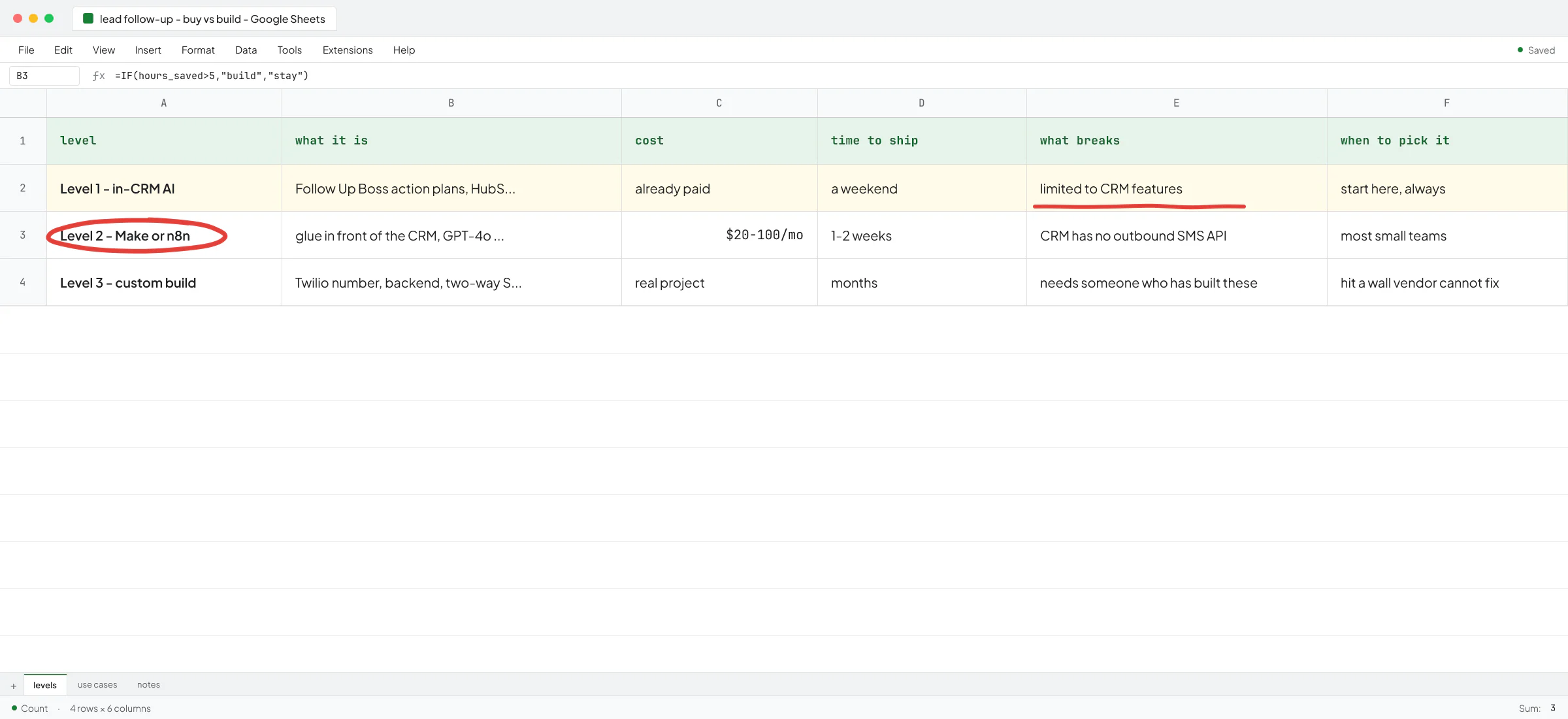
Tier one is ChatGPT Business or Claude Team for the whole recruiting team, used for CV reformatting, JD drafting, follow-up writing, candidate summaries, market research briefs, and any ad-hoc writing task. This is toolsmaxxing at the model layer.
Tier two is a workflow tool that the ops person or lead recruiter runs - Make.com, n8n, or Zapier - to wire the boring plumbing: new job in inbox goes to Notion, new candidate in ATS pings the assigned recruiter on WhatsApp, weekly pipeline summary lands in Slack every Monday morning. AI nodes inside those workflows handle the summarizing and matching. See n8n vs Make for which one to pick.
This gets a lot of agencies further than they expect. Toolsmaxxing before buying is usually the right call.
When you actually need a custom build
Custom engineering pays back when three things line up: the workflow is core to how you make money, it runs high-volume (dozens of times a day, not once a week), and the off-the-shelf options break on your specifics.
The recruitment SaaS I've been building for hits all three. Their job-monitoring agent watches multiple job portals, checks each new posting against every recruiter's preferences (industry, seniority, geography, salary band), searches Apollo for matching candidates, and pings the recruiter with the job and shortlist on WhatsApp. When they were testing with two or three recruiters this ran fine on frontier reasoning models. When they rolled out to more recruiters and hundreds of new postings a day, the LLM cost and latency both spiked. I re-architected the pipeline onto small non-reasoning models with shorter outputs and fewer calls per job. Quality dropped slightly, throughput went up, cost dropped substantially. That kind of trade-off is the sort of thing a Make.com workflow can't decide for you.
The other client I want to flag here is Sellify AI, where I worked for two years as an AI engineer alongside technical co-founder Ivan Nikolaichuk. Sellify sells AI SDRs to pest control companies. It isn't recruitment, but the pattern is close - an AI making inbound calls to existing customers, handling conversation state, integrating with a legacy CRM, staying on-brand for a specific vertical. Sellify's client HomeTeam Pest Defense generated over $1M in a single campaign month and 112% year-over-year growth from that system. That kind of outcome doesn't come from a Zapier flow. It comes from a purpose-built agent that owns the workflow end to end.
For a recruitment agency, the custom-build territory looks like: a job-portal monitor that filters by recruiter preferences, an outbound sequencing engine that drafts and personalizes to your voice at scale, a candidate-nurture agent that keeps warm candidates warm across months. For one staffing agency I built a ChatGPT-style candidate search right on their WordPress site - employers type what they want in plain language, and the agency captures the lead. The pattern is a high daily decision volume where a human doing it becomes the bottleneck, and decisions patterned enough that AI can learn them.
Decision rule: how to sequence this in the next 30 days
If I were running a 5-15 person agency today, I'd sequence it like this:
- Get the whole team on a paid ChatGPT or Claude plan with training off. Set a house prompt for CV reformatting, JD writing, and candidate outreach drafting. This alone gets you the biggest hour savings.
- Pick one workflow that's hurting - probably weekly pipeline reporting or candidate follow-up - and try to solve it with Make.com, n8n, or a Notion AI setup before you talk to anyone about a build. Toolsmaxx first.
- Only after those are in place should you evaluate a custom build. The right custom build isn't AI-everywhere. It's one specific bottleneck (usually inbound job monitoring, high-volume outbound, or client reporting) that becomes cheaper and faster with a purpose-built agent.
If you're on step three and unsure whether what you want to build is realistic in your budget and timeline, that's the moment to talk to someone who ships these systems. Ove tried step three with the wrong freelancer first - a ChatGPT agent that couldn't do the job - before we rebuilt it the right way. His full video testimonial walks through that mistake.
Ivan Nikolaichuk, the technical co-founder at Sellify who worked with me for those two years, wrote on LinkedIn: "Vlad knows his craft well and was able to handle complex engineering tasks independently. He is quick to learn new things and adapts fast when requirements change (and in startups, they almost always change)." Requirements changing is the default in recruitment automation projects too - roles shift, portals change layout, clients want new fields - so the person building it needs to survive that.
If you want a second opinion on where AI fits in your agency before you commit to a tool or a build, book a call. Bring one workflow you'd most like to fix, and I'll tell you which of the three tiers above it belongs in.
FAQ
Is it safe to use ChatGPT with candidate data?
On the free and Plus plans, your conversations can be used to train models unless you turn training off in settings. On ChatGPT Business, Enterprise, and Team plans it's off by default. For candidates under any confidentiality expectation, use Business or Team, and skip the free plan. See is ChatGPT safe for confidential information for the fuller picture.
Will AI replace recruiters at small agencies?
Not in the shape people talk about. AI handles the repetitive slices - reformatting, drafting, matching - well. The relationships, the judgment on cultural fit, the tough client conversations, and the closing don't automate. Small agencies that use AI to do more of the low-value work with the same team beat agencies that either ignore it or try to full-automate.
Can I automate LinkedIn outreach with AI?
You can use AI to draft the messages. Sending them through browser bots or scrapers violates LinkedIn's prohibited software policy and puts your Recruiter account at risk. Use LinkedIn Recruiter's own InMail sequencing for the sending; let AI handle the writing.
What's the cheapest useful AI setup for a two-person agency?
One paid ChatGPT Plus or Claude Pro seat, shared prompts for CV and JD work, a free Make.com plan for one or two automations. You can be running in a week for under $50/month total.
How do I know if I need a custom build or can just use tools?
If the workflow you want to fix runs less than a few dozen times a day and the off-the-shelf tools (ChatGPT, Notion AI, Make.com) get you 70%+ of the way there, don't build. If it runs hundreds of times a day, the tools break on your specifics, and it's core to how you make money, build. See AI consulting for small B2B firms for how a good consultant helps you make that call without upselling you.