You've decided you want to automate a few things in your firm - new lead notifications, invoice routing, monthly reports, maybe a small AI step in the middle. Every Twitter post and YouTube tutorial says either n8n or Make. The marketing pages sound similar, and you can't tell which one fits.
Short version: Make is the faster on-ramp if your team is non-technical and your workflows are mostly "when X happens in tool A, do Y in tool B". n8n is the better long-term bet if you want to self-host for data reasons, run more than a few thousand executions a month, or add AI steps with real code around them. Picking wrong costs you a few months and a rebuild, it's not the end of the world, but it's avoidable.
What Make is, in one paragraph
Make (formerly Integromat) is a cloud workflow automation tool with a visual canvas. You drag connectors for the apps you already use - Gmail, Sheets, HubSpot, QuickBooks, Slack - draw lines between them, set some filters, and the scenario runs. It's hosted by Make on AWS. You pay by "operations" (each module run counts as one), and the cheapest paid plan starts at $9/month for 10,000 operations. There are over 2,000 prebuilt app connectors.
The mental model is: a scenario is a flowchart on a canvas, and Make runs it.
What n8n is, in one paragraph
n8n is also a workflow automation tool with a visual canvas, but it's open-source and you can run it yourself. You can use n8n's cloud plans (Starter at €20/month, Pro at €50/month, Business at €667/month) or self-host the Community Edition for free on your own server. Pricing is by workflow execution rather than per module - one execution can do 50 steps and counts as one. There are 400+ integrations plus a generic HTTP node, and most nodes let you drop into JavaScript or Python if the no-code path doesn't fit.
The mental model is: a workflow is a flowchart on a canvas that runs on infrastructure you can move.
Side-by-side: what matters for a small firm
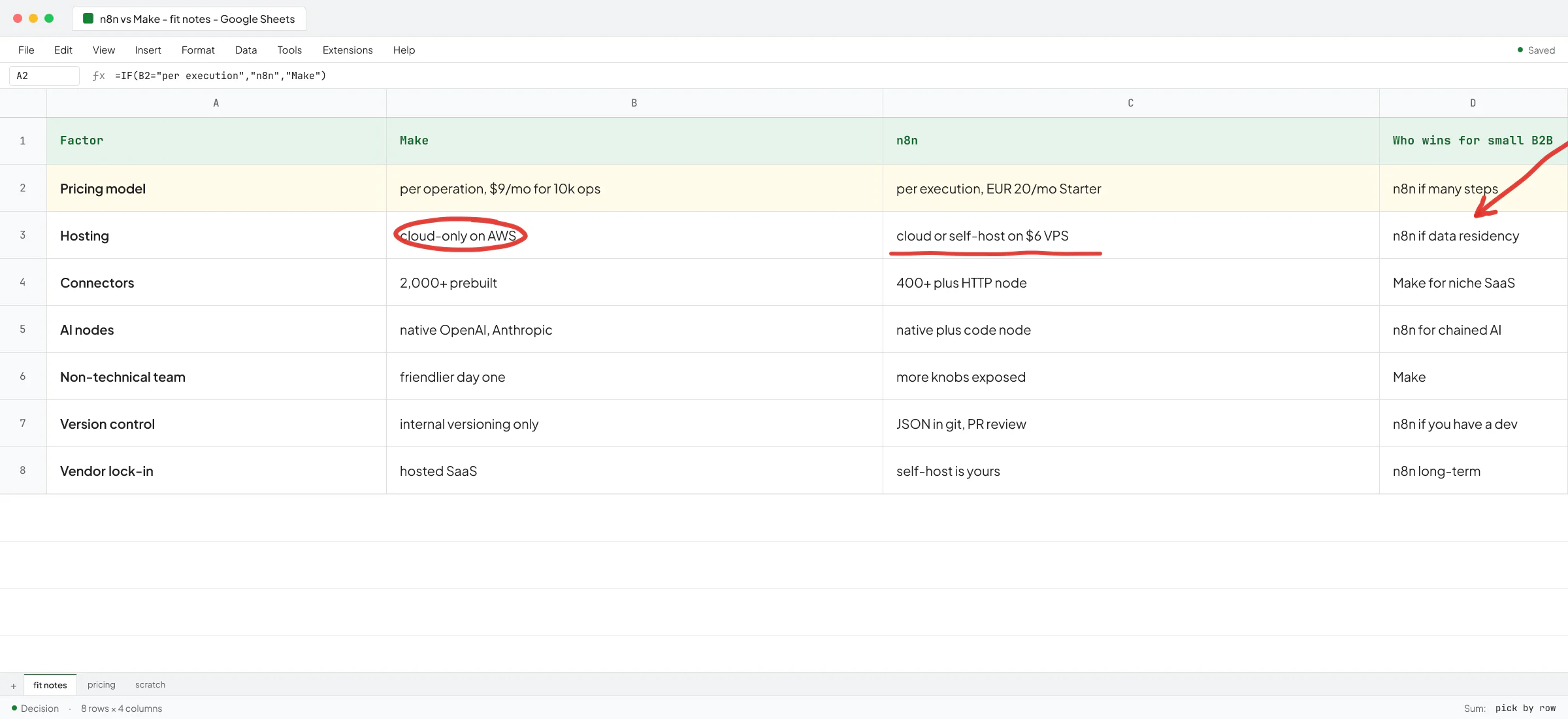
Pricing model. Make charges per operation, and n8n charges per execution. If one of your workflows takes 30 steps to handle a single new lead, Make counts 30 operations and n8n counts 1. For workflows with lots of steps, n8n's plan goes much further than the headline price suggests.
Hosting. Make is cloud-only on AWS in EU or North America. n8n runs both on its cloud and on your own server (Docker on a $6/month VPS works fine for small workloads). If your clients have data-residency clauses in their NDAs - common in legal, healthcare, and EU B2B work - self-hosted n8n is the one that lets you sign those NDAs honestly. If that's not your situation, hosting doesn't really matter and Make's hosted experience is smoother.
Connector library. Make has more prebuilt connectors for niche SaaS tools. n8n has the big ones (Google, Microsoft, Slack, HubSpot, Salesforce, Stripe, Airtable, OpenAI, Anthropic) plus a generic HTTP node and a code node that closes the gap when a connector doesn't exist. For a typical small B2B stack you'll find both tools cover what you need; for a long tail of vertical SaaS, Make is more likely to have something out of the box.
AI nodes. Both have native nodes for OpenAI, Anthropic, and the usual suspects. n8n's AI nodes are more flexible because of the code node - if you need to chain a model call, parse the output, hit an internal API, and route based on what came back, n8n handles that in one workflow. In Make you'd often end up wiring three or four scenarios together. For a single "summarize this email and tag it" step, both work fine.
Non-technical team. Make's UI is friendlier the first day. If your operations person has never seen a developer tool, they can build a scenario in Make in an afternoon. n8n looks similar but exposes more knobs that don't make sense until you've thought about retries, error workflows, and webhook nodes.
Version control and team workflow. n8n stores workflows as JSON that you can put in a git repo and review like code. Make has internal versioning but no real git story. If you have a developer on the team and you want changes to go through a pull request, n8n is the answer. If you don't, the question doesn't really come up.
Vendor lock-in. n8n self-hosted is yours - if pricing changes you keep running. Make is a hosted SaaS. For most small firms this is fine; for firms that build a critical operational backbone on top of it, it's worth thinking about.
A working example from a real client
The CEO of an Oslo-based real estate development firm hired me to fix their monthly reporting. They were piecing data together from Tripletex (their Norwegian accounting system) and Excel by hand, and the CFO was downloading spreadsheets and matching transactions row by row. The CEO described his pain as getting the report a year and a half after the books closed, by which point they'd already lost serious money on projects nobody noticed in time.
For that build I picked Make instead of n8n. The reasons:
- The team was non-technical. The CFO is a PhD candidate in finance, not a developer. Make's canvas was something he could read and eventually edit.
- The workflow had maybe 5-8 steps - pull from Tripletex, transform, push to a Google Sheet that fed a Looker Studio dashboard. Operation count was manageable.
- They had no in-house engineer. Self-hosting n8n would have meant me being on the hook for the server forever, which doesn't fit a "have it run on its own" outcome.
- $20/month subscription, no infrastructure to manage, and the CEO understood the bill.
If the same firm had wanted a more complex AI pipeline next - say, an agent that reads incoming construction-permit applications, classifies them, and drafts responses - I'd have switched to n8n or written it from scratch in code. The shape of the next problem changes the answer.
Where both tools quietly fail
Workflow tools are great for "when X, do Y" gluing. They start to break down in a few places.
Conversational AI is the first one. If you want a customer-facing agent that talks to a tenant or a buyer over WhatsApp and books an appointment, you can build a toy version in either tool. The production version - the one that handles 50 conversations a day without going off the rails - needs real code and an evaluation harness. At Sellify AI we built an end-to-end AI sales system for the US pest control industry; it talks to homeowners as "Anna" so naturally that customers were calling branch offices to confirm she was a real team member. That system helped HomeTeam Pest Defense generate over $1M in new mosquito revenue in a single campaign month. None of that lives in n8n or Make - it's a custom application, and that's why it works. Thomas K. Lundberg, the CEO of Sellify AI and former co-owner of Fox Pest (which Rollins acquired for around $350M), wrote about the work on LinkedIn: "Vlad has been incredible to work with. Very sharp and understands the intricacies and needs of our company. Have trusted him with important tasks, and he's always been able to get creative and deliver."
High-volume AI workloads is the second one. Both tools can call OpenAI in a loop, but neither gives you the cost controls, model routing (frontier model for hard cases, cheap small model for easy ones), or evaluation tests you need when you're paying for hundreds of thousands of LLM calls a month. At a recruitment AI client I rebuilt their main pipeline to swap reasoning models for non-reasoning small ones; quality dropped slightly, and speed and cost dropped a lot, so the system became usable at scale. That work was custom code, not a workflow tool.
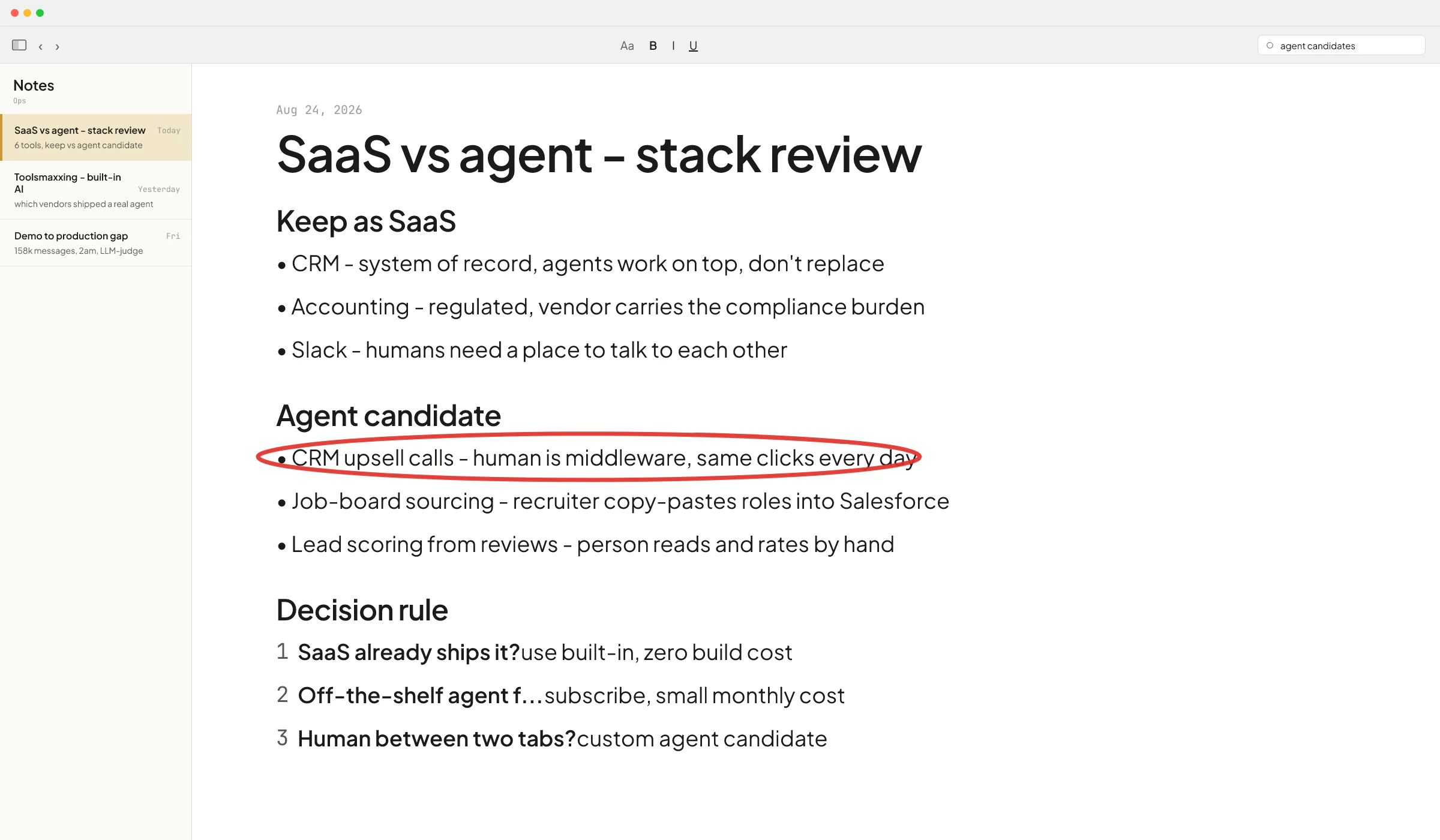
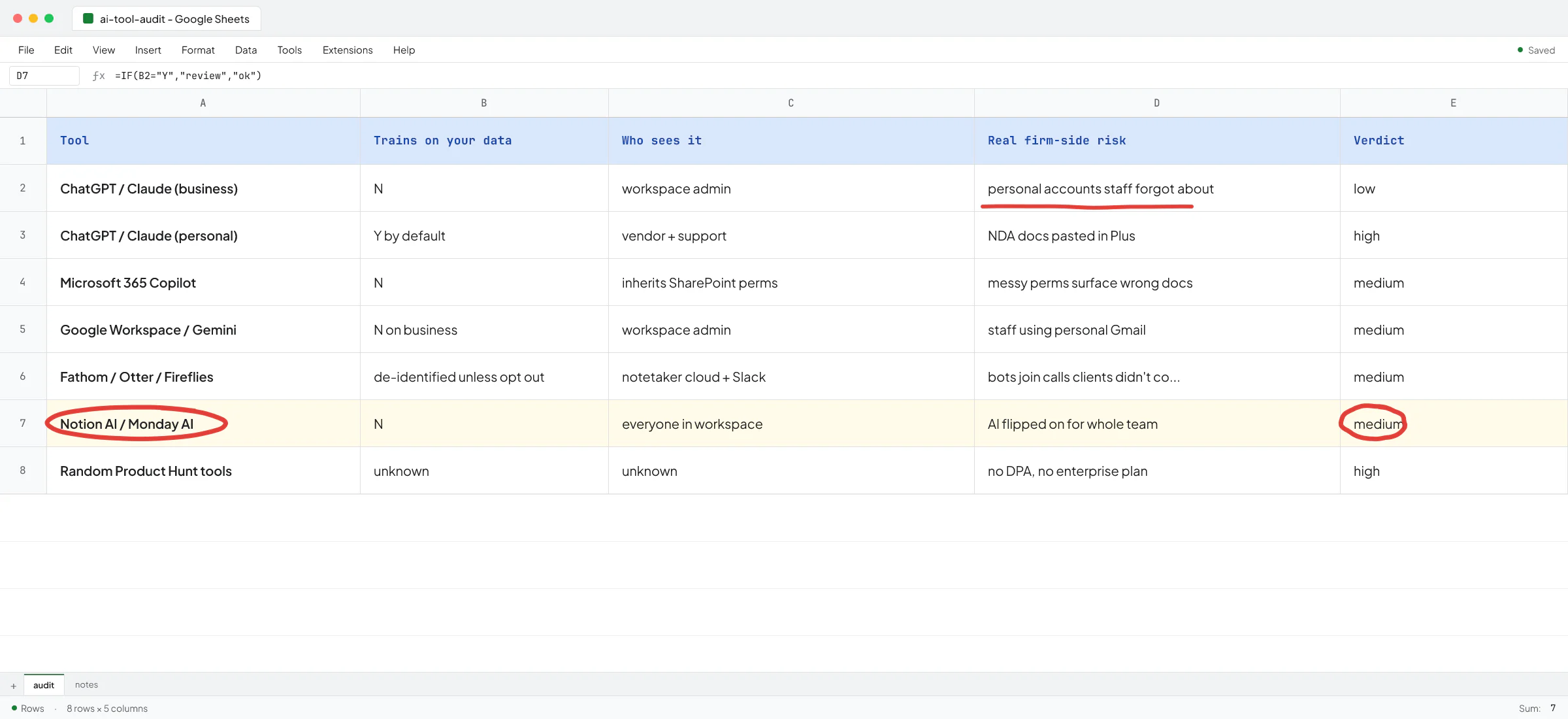
Tools you already pay for is the third one. Before you put either n8n or Make on the credit card, check what your existing stack already does. Notion has built-in AI for drafting and structuring pages. Monday has built-in automations for "when row added to table X, update status in table Y". QuickBooks has its own AI assistant. I call this toolsmaxxing - using features in the tools you already pay for to the max - and it's the cheapest place to start.
A decision rule
Use this in order. Stop at the first one that fits.
- If your problem is one step inside a tool you already pay for (Notion, Monday, QuickBooks, HubSpot), toolsmaxx first.
- If your workflow is mostly app-to-app gluing, your team is non-technical, and you don't have data-residency constraints, pick Make.
- If you have lots of steps per workflow, you want to self-host for data reasons, you need code nodes inside a workflow, or you have a developer who'll maintain it, pick n8n.
- If the thing you want is a customer-facing agent, a high-volume AI pipeline, or anything that needs evaluation tests and guardrails, neither tool is the answer. Write it as a real application.
Most small B2B firms I talk to land at step 2 or 3. A few should be at step 1 and haven't checked. A small but growing number are at step 4 and don't know it yet - they keep duct-taping n8n nodes together for six months before they admit the shape of the problem is wrong.
What it looks like in practice
The pattern I see most often: a founder pays for a workflow tool, builds three useful scenarios in the first month, then hits a wall on the fourth one and assumes it's their fault. Usually it isn't. The fourth scenario is the one where the workflow tool was the wrong shape, and the right move is either to simplify the scenario or to pull it out into code.
A couple of common mistakes I see:
- Picking n8n because it's the "developer choice" when the team has no developer to maintain it. The workflows work for six months, then something breaks at 9pm on a Friday and nobody can read the logs.
- Picking Make because it's friendlier, then discovering at month four that the operation count makes a moderately complex AI pipeline cost more than a custom build would have.
The right call is whichever one matches the shape of your team and the shape of your next two problems, not the shape of your current one.
Pick the tool, ship one workflow, run it for a month, then decide if you want a second. The worst thing you can do is design a "complete automation strategy" before you've shipped anything. If you're stuck on which one fits your specific stack, or you suspect you're at step 4 and don't want to spend three months proving it, book a call with Vlad and we'll walk through your workflows together.
FAQ
Is n8n better than Make?
Neither is better in general. n8n is better if you want to self-host, run lots of steps per workflow, or write code inside a workflow. Make is better if your team is non-technical, your workflows are mostly app-to-app, and you don't want to manage infrastructure.
Is n8n free?
The Community Edition of n8n is free and open-source if you self-host it (you pay for the server, which can be as low as $6/month on a small VPS). n8n's hosted cloud plans start at €20/month.
Can I use n8n in production?
Yes. n8n is used in production by many firms - both self-hosted and on the cloud Business plan. The questions to ask aren't about n8n itself but about your setup: do you have backups, monitoring, error workflows, and someone who can fix a broken node before it costs you a day of revenue.
Make vs Zapier vs n8n - which one?
Zapier is the most beginner-friendly but the most expensive per task at scale. Make sits in the middle - cheaper than Zapier, friendlier than n8n. n8n is the most flexible and the cheapest at high volume but has the steepest learning curve. For a small B2B firm that already has a stack and wants to add automation, Make is usually the right starting point unless you have a developer or data-residency needs.
Do n8n and Make work for AI agents?
For simple AI steps inside a workflow - "summarize this email", "classify this lead", "draft a reply" - yes, both work and both have native nodes for OpenAI and Anthropic. For real AI agents that have conversations, make decisions across multiple turns, and need guardrails and evaluation tests, neither tool is the right shape. That work belongs in custom code.
How much does it cost to automate a small business with n8n or Make?
The tool cost is small - $9-50/month on either platform covers most small firms. The real cost is the build time. A simple "new lead arrives, notify Slack, add to CRM" scenario takes an afternoon. A multi-step workflow with AI, error handling, and human-in-the-loop approval takes a week or two of focused work. Most firms underestimate the second number by a factor of three.