Most small firms I talk to have the same Monday morning. Someone opens Meta Ads, a CRM, a spreadsheet of sales calls, and a project tracker. They copy numbers into a doc, write a few sentences of "what changed this week", and paste it into Slack or email. It takes a few hours every week, and the person doing it is usually the most senior person on the team.
An AI weekly report generator is a setup that does this on its own - pulls the numbers from the source systems, writes the summary, drops it where the team reads it. The question is which version you need.
ChatGPT alone covers a surprising amount. A workflow tool like Make or n8n covers more. And there's a point where it stops being a tool-you-buy problem and becomes a small pipeline that someone has to build for you.
Here's how to tell which one you're at.
What a weekly report really is, before we pick a tool
I keep hearing the same setup from owners: there's a recurring meeting (Monday standup, weekly leadership sync, client check-in), and the report exists to feed that meeting. The data lives in three or four places. The hard part isn't writing the summary - it's gathering the inputs.
A fitness-coaching founder I spoke with wanted a weekly report on how new ads were doing so he could work with the creative team on messaging. The inputs were Meta Ads, a tagging convention, and the team's own creative brief. He also wanted an overview of the week's sales calls - and the calls were sitting in Fathom, the AI notetaker. Two reports, different inputs, same Monday slot.
A Norwegian real-estate developer I spoke with wanted something else - a weekly view of how many leads came in and how many got rejected. His data lived in Tripletex (accounting), Monday.com, and a folder of PDFs from applications submitted to authorities.
Before picking a tool, write down two things on paper:
- The 3-6 data sources the report pulls from.
- The decision the report is supposed to drive. ("Should we keep this ad creative running?" is a real decision. "Stay informed" is not.)
If you can't name the decision, no AI will help you. You'll just generate a prettier PDF that nobody reads.
Option 1: ChatGPT alone (the cheapest version that often works)
If the report is mostly narrative on top of a few exports, ChatGPT or Claude on the paid plan covers it. The owner pastes in the week's data and gets a written summary. For a small coaching shop or solo agency, that's often the whole job.
What this looks like in practice:
- Export Meta Ads as CSV at the end of the week.
- Pull Fathom transcripts for the week's sales calls into one doc.
- Paste both into ChatGPT with a saved prompt: "You're our weekly ops analyst. Summarize ad performance vs last week, flag the top 3 creative learnings from calls, and write a 200-word Slack update."
No integrations, no automation. The owner still does the copy-paste, but the writing part - usually 60% of the time - is gone.
This works well when one person assembles the report, the inputs are 3 or fewer with clean exports, and the audience is internal where "good enough" is genuinely good enough.
It stops working when the same person is doing the same copy-paste every Monday and it's eating their morning, when someone has to remember to do it (and sometimes forgets), or when the data lives in systems with no clean export - a legacy CRM, a property management tool, a custom internal database.
Before signing up for ChatGPT Business or Team for the whole firm, check what's safe to paste. For a breakdown of which plan handles what, the ChatGPT for small business pricing guide goes plan by plan, and the confidentiality guide covers what should never get pasted in the first place.
Option 2: Make or n8n (when the copy-paste is the bottleneck)
Once the report is well-defined and the copy-paste is the real cost, a workflow tool earns its seat. Both Make scenarios and n8n let you trigger a workflow on a schedule (every Monday at 8am), pull data from a list of sources, send it through an AI step, and drop the output in Slack or email.
A typical weekly-report scenario in Make looks like this:
- Trigger: every Monday at 8am.
- Pull last 7 days of Meta Ads data via the Meta Ads module.
- Pull last 7 days of Fathom call summaries.
- Pull deal-stage changes from the CRM (HubSpot, Pipedrive, Follow Up Boss).
- Feed the combined data into an OpenAI or Anthropic module with a prompt.
- Post the result to a Slack channel.
That whole thing takes a half-day to wire up the first time. After that, it just runs.
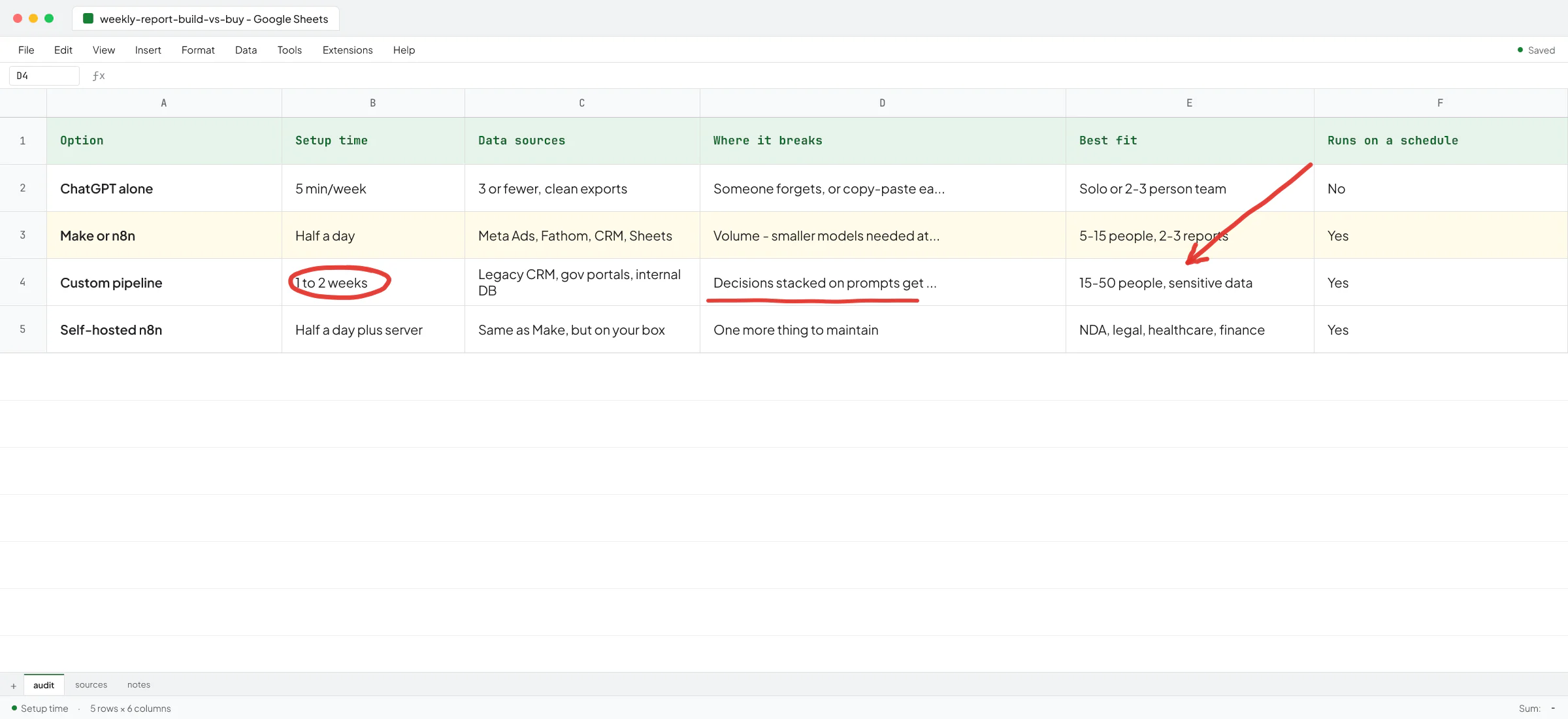
n8n is worth knowing about specifically because you can self-host it. For firms doing NDA-covered client work (law, accounting, recruitment with candidate PII), running the workflow on your own server matters because the data never leaves your infrastructure on the way to OpenAI. If you're weighing the two, the n8n vs Make comparison walks through how to pick.
Most firms stop here. A coaching brand, a small agency, a 5-person consulting shop - Make or n8n plus a small AI prompt step is the right answer maybe 70% of the time. It's also where many builds quietly fall apart at volume. I built a pattern like this at a recruitment AI startup (context in Ivan's LinkedIn recommendation): a job-monitoring agent that scrapes job portals, scores fit against recruiter preferences, and notifies via WhatsApp. The first version used frontier reasoning models and was high-quality but too slow once the rollout went from 2-3 recruiters to dozens. I redesigned it to use smaller, non-reasoning models with tighter outputs and the speed problem went away. That kind of tradeoff lives below the surface of any weekly-report build... it doesn't show up until the volume does.
For more on this layer, the AI workflow automation playbook gets into what to automate first.
Option 3: A custom pipeline (when Make and n8n hit a wall)
There's a point where the off-the-shelf tools stop working, and it's usually one of three things:
- The data source has no usable integration. A legacy property management tool, a government portal, an internal database the previous developer built.
- The report needs decisions, not summaries. "Flag any client whose response rate dropped more than 20% week-over-week, cross-reference with their account manager, and prioritize the list." That's logic, and prompts get unreliable when you stack logic on them.
- The data is too sensitive for a public AI API. Healthcare-adjacent, financial, or high-PII recruitment data where the firm's policy says it can't go to OpenAI even on a Business plan.
When I worked with Ove Andre Remme, founder of the Norwegian therapy education company Terapivakten, on long-form content generation, he'd already burned two weeks on a custom-GPT version built by another freelancer. It generated 40% less content than needed, and when pushed harder, the content quality fell apart. The fix was a different architecture for the job. Ove talks through this in a short video testimonial: "You were directly pointing to the issue that I experienced." A weekly report generator has the same failure mode. If a ChatGPT version was tried and it kind of works but quietly drifts week-over-week, that's the signal you're at this layer.
Custom doesn't have to mean expensive or slow. For a 5-person firm, it usually means a small Python script on a cheap server that pulls from the APIs you need, hits OpenAI or Claude for the writeup, and posts to Slack. A week or two of work, and then it runs.
Use a custom build when the data source has no integration (you'd be surprised how often this is the actual blocker), when the report drives a real decision and a generic LLM summary isn't enough, or when the firm can't legally send the raw data to a public AI service. For everything else, Make or n8n plus ChatGPT is faster and cheaper to live with.
What I'd do at each firm size
Different firms hit the wall at different points. Rough guide:
- Solo or 2-3 person team, one report, clean exports: ChatGPT alone. Don't over-engineer.
- 5-15 people, 2-3 weekly reports, mix of SaaS sources: Make or n8n. Wire it once, ride it for years.
- 15-50 people, multiple departments running reports, some sensitive data, at least one weird source: custom pipeline, often built on top of an n8n base.
- Anyone with a strict privacy posture (legal, healthcare, finance): custom, self-hosted, regardless of size.
A property management owner I spoke with had Follow Up Boss (CRM), DoorLoop (property software), and Google Sheets. Three sources, one decision-driver per report - that's a Make build, not a custom one.
The trap to avoid: "we'll build it ourselves in ChatGPT"
The pattern I see often: someone on the team is good with ChatGPT, they prototype a weekly report by hand, it works once, and then it slowly stops working. The prompt gets longer. The exports change format. Someone forgets to run it. After 3 months, the report quietly dies and nobody mentions it.
This is the same trap Ove hit before he came back to me. ChatGPT in the browser is great for the first version. It's not great for a version that has to run every Monday for two years without a human watching it.
The fix is moving the report from "a thing someone does" to "a thing the system does" - which is where Make, n8n, or a small custom pipeline take over. If a weekly report is important enough to commit to, it's important enough to get out of someone's manual queue.
Before you build anything
The only reason to spend money automating any of this is the meeting the report feeds. If nobody acts on the weekly report, automating it just lets you waste time faster.
Before you build any version, sit with the meeting once and ask: when this report says X, what changes? If you can't answer that, the report isn't a tooling problem yet.
If you want a second pair of eyes on what's worth automating in your weekly reporting and what to leave alone, book a call. Walk me through the sources you're pulling from on Monday morning, and I'll tell you whether ChatGPT, Make or n8n, or a small custom build is the right floor for your firm.
FAQ
What's the cheapest way to start automating a weekly report?
A paid ChatGPT or Claude plan plus a saved prompt. You still copy-paste the exports in, but the writing time goes from an hour to five minutes. If that's the bottleneck, that's the whole fix.
When does Make or n8n make more sense than ChatGPT alone?
When the copy-paste is the bottleneck - someone is gathering exports from 3+ systems every week, and either they're forgetting or it's eating their Monday morning. Wire it once and the workflow runs on a schedule.
Is self-hosted n8n worth it for a small firm?
Only if you have a real privacy reason - NDA-covered client work, healthcare-adjacent data, or a firm policy that data can't go to OpenAI. Otherwise Make Cloud or n8n Cloud is one less thing to maintain.
Can ChatGPT pull data from Google Ads or Meta Ads on its own?
Not reliably. Browser ChatGPT can read what you paste in. To pull live data from ad platforms on a schedule, you need a workflow tool (Make, n8n, Zapier) or a custom script using the platform's API.
How long does it take to build a real weekly report pipeline?
A simple Make scenario for one report is half a day. A custom pipeline with 3-4 data sources, a real prompt, and Slack delivery is usually one to two weeks of work, depending on how cooperative the source systems are.
What happens if the AI summary is wrong one week?
It will be, occasionally. Keep the raw numbers visible alongside the summary so the reader can sanity-check. Treat the AI part as draft prose you skim, not as truth.