You have a folder. PDFs from vendors, hundreds of them, sometimes thousands. Different layouts. Some scanned, some clean exports from a vendor portal, some forwarded as email attachments. Someone on your team opens each one, types the vendor name, the date, the amount, the line items, the project code, then files it. By the end of the month they have done this for a stack of paper that is taller than the laptop.
This is what people mean when they search for AI invoice data extraction. The OCR-a-single-receipt thing has been a built-in feature in QuickBooks Online's Receipt Capture for years - snap or upload a receipt and it pulls the vendor, date, and amount. The thing accounting partners and construction PMs ask about is the level up from that: a pipeline that handles a high-volume mix of formats, knows your project codes and your chart of accounts, catches duplicates, and writes the result back into the books without anyone re-typing.
I'll walk where the built-in tools already win, where AI changes the math, and the point where a custom pipeline starts paying back inside a small firm.
Where the built-in tools already win
If you're sending a few dozen receipts a month and you're already on QuickBooks Online or Xero, you probably don't have an AI problem yet.
QuickBooks Online auto-extracts the vendor, date, amount, and last four of the card from photos and uploaded files, then matches against bank-feed transactions. Xero does the same with Hubdoc. Dext sits on top of either one. These tools use OCR plus pattern matching trained on millions of invoices, and for common formats they get the basic fields right most of the time.
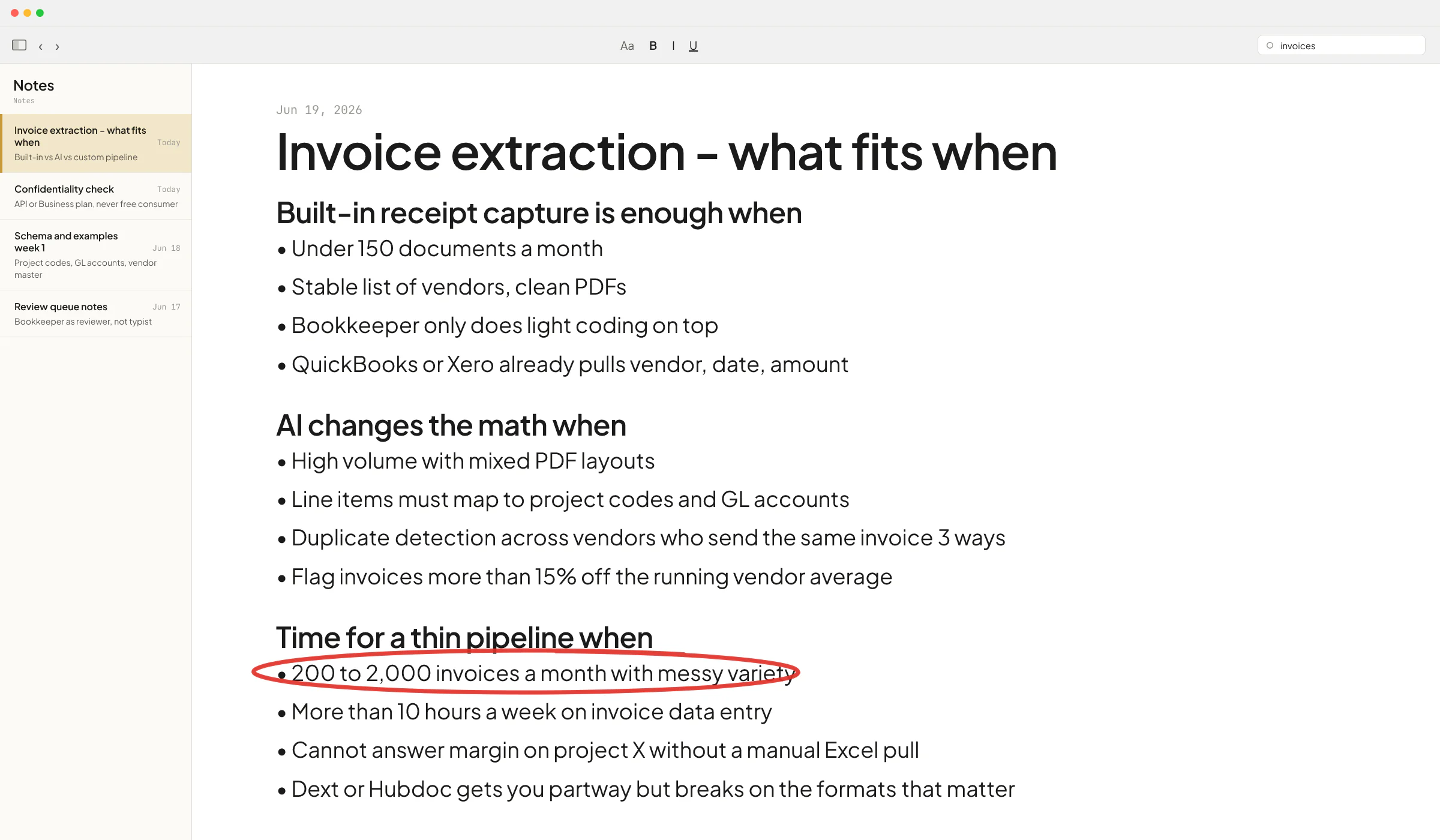
Open last month's invoices. If you have under maybe 150 documents, all from a stable list of vendors, all in clean PDF form, and your bookkeeper only does light coding work on top, the built-in receipt capture is the right answer. Adding AI here is overkill and you'll spend more on engineering than the time it saves.
This is the toolsmaxxing point I keep making in the piece on using the tools you already pay for. The features are already in your stack. Use them first.
Where AI changes the math
The math flips when one of these things is true.
- Volume with variety. A real-estate development firm I scoped this work with in Oslo had a construction lead who put it bluntly on our call: he gets thousands of invoices in PDF, and he needs to sort them, read what's inside, categorize them, and put them into the right document. He called it a "mind job and hand job." Same firm, the CFO told me he couldn't build a real cash-flow report in their accounting system because everything had to be downloaded to Excel and matched manually. Two people doing the same upstream work because no off-the-shelf tool sees the whole picture.
- Field complexity beyond receipt capture. Vendor name, date, and amount are easy. The fields that matter for a construction GC or a property manager are line items mapped to a specific project code, GL account, and cost category. Receipt capture doesn't know what your project codes are. AI can, if you give it the list and a few examples per category.
- Downstream logic. Duplicate detection across vendors who send the same invoice three different ways. Three-way match against a PO and a goods-receipt note. Flagging an invoice whose amount is more than 15% off the running average for that vendor. These aren't extraction problems, they're accounting workflow problems sitting on top of extraction.
When you cross any of those lines, generic OCR stops being the constraint. The constraint becomes whoever connects the extracted data to your project codes, your books, and your reports without breaking the audit trail.
The build-vs-buy decision for a small firm
There is a middle ground that most firms miss. You don't need to choose between Dext and a six-figure custom build.
For a firm doing 200 to 2,000 invoices a month with messy variety, the right setup is usually a thin pipeline. A model like GPT-4o or Claude reads each PDF against your specific schema (project code, GL account, vendor master, line-item structure), the output lands in a review queue your bookkeeper clears in minutes instead of hours, and confirmed records sync to QuickBooks or Xero through the official API. The AI is one piece in a bigger setup that includes the schema, the review queue, the duplicate check, and the sync.
This is the same architecture pattern that worked at Sellify AI, the pest-control sales-automation startup where I spent two years as an AI engineer. The technical co-founder Ivan Nikolaichuk, who recommended my work on LinkedIn and led architecture there, made the call early to never trust AI output blind - we wrapped it in checks, evaluators, and a human review surface for anything risky. The same pattern shows up in HomeTeam Pest Defense's published case study for the platform, where Mike Johnson, VP of Operations at HomeTeam, said the campaigns ran in the background while the sales team stayed focused on new acquisition. Invoice extraction works the same way: most invoices go straight through, the edge cases get flagged, and the bookkeeper becomes a reviewer instead of a typist.
The same trade-off shows up with a current recruitment AI client of mine. We started with frontier reasoning models for the entire job-matching pipeline. When they scaled to dozens of recruiters and hundreds of jobs a day, latency degraded badly. I redesigned the flow to use small, fast models with tight outputs for the routine work and kept the bigger models for the edge cases. Quality dropped slightly, cost dropped a lot, and the system became something you could rely on at scale. For high invoice volume, the same trade-off is what keeps the running cost sane.
A note on confidentiality before anyone clicks "upload"
This part trips up almost every firm I talk to. If your invoices contain client names, project budgets, or pricing your vendors consider confidential, pasting them into a free ChatGPT account is not the move. OpenAI's API does not train on customer data and retains content for 30 days by default for abuse monitoring, which is the right tier for production use. Consumer ChatGPT has different defaults. I wrote more on the plan-by-plan breakdown in the confidentiality piece, and the takeaway is the same: route the work through the API or a business plan, never the free consumer app, and pick a vendor whose data handling matches the sensitivity of the invoices.
This is the situation Ove Andre Remme, founder of the Norwegian therapy practice Terapivakten, described when he recorded a video testimonial about the course-generation system I built for him. He had first hired a freelancer who tried to solve a high-volume content problem with a chat-agent shortcut. It didn't work. Once we mapped the real workflow, the right answer was a proper pipeline with the right model choice and the right guardrails. The principle holds for invoices too - the shortcut that works on three documents won't survive three thousand.
When to bring someone in
A few signals say the in-house spreadsheet workaround has run out of room. You're spending more than ten hours a week on invoice data entry across the team. You can't answer "what's our margin on project X right now" without a manual Excel pull. You've tried Dext, Hubdoc, or a Power Automate flow and it gets you partway but breaks on the formats that matter most. At that point the math on a custom pipeline starts to make sense, because the engineering cost is amortized across a problem that recurs every month.
If you want to walk through your specific stack and figure out whether the answer is toolsmaxxing your current accounting software, layering AI on top, or building a real pipeline, grab a slot on my calendar and bring last month's invoice folder. Half the time the answer is to turn on a feature you already pay for. Other times it's a build that pays back inside a quarter.
FAQ
Can AI extract data from any PDF invoice?
Mostly yes for the common fields - vendor, date, totals, basic line items - if the PDF has selectable text. Scanned-image invoices need an OCR pass first, which most modern AI tools include automatically. The harder part is mapping line items to your specific project codes or GL accounts, which the AI can't guess without examples. Plan to spend the first week of any project on schema and examples, not on prompts.
Is QuickBooks Online's built-in receipt capture good enough?
For a small firm with under roughly 150 documents a month, all from stable vendors, in clean PDF form, yes. It auto-extracts vendor, date, and amount and matches against your bank feed. Once you cross into high volume, mixed formats, or project-coded line items, you need something purpose-built on top.
What does an AI invoice extraction pipeline cost to run?
The variable cost per invoice on modern AI APIs is small - usually a fraction of a cent in model calls. The real cost is the engineering to connect extraction to your schema, your review queue, your duplicate check, and your accounting sync. Once built, a small firm can usually run the infrastructure for a modest monthly bill. The build itself is the investment, sized to the complexity of your workflow.
Is it safe to send client invoices to ChatGPT?
Not the free or Plus consumer tiers if the invoices contain confidential client data. The API and ChatGPT Business/Enterprise plans have different defaults - OpenAI does not train on this data and retention is bounded. Route production work through the right tier, not a personal account.
How long does an AI invoice extraction project take to build?
For a small firm with a defined chart of accounts and a stable accounting system, the first usable version usually lands in two to four weeks. Tuning it to handle edge-case formats and adding the audit-friendly review queue is another few weeks on top. Anyone promising a one-week build for a real production pipeline is selling a demo.