You're recording every sales call. Maybe Fathom, maybe Otter, maybe a Zoom transcript that lands in a Google Drive folder nobody opens. Per-call summaries show up and they're fine. The problem is the one you keep hitting - you can read one call, but you can't see all of them at once.
A coaching firm founder I talked with said it like this - he can see individual call stuff but he can't see overviews of all the calls. He had Fathom running, a hundred-plus calls recorded, and no way to answer a basic question - what objections keep coming up this month. That's the gap AI sales call analysis is supposed to close. Most tools don't close it. Some do. And some of the work has to be built.
This piece walks through the off-the-shelf tools and where they stop, what a custom pipeline looks like when you outgrow them, and how to keep client data from leaking on the way.
What AI sales call analysis actually means
Three different jobs hide under the same phrase, and mixing them up is why people buy a tool, get value for a week, then feel like nothing changed.
- Per-call analysis: a recording becomes a transcript, then a summary with action items, sentiment, talk-time ratios. Fathom, Otter, Fireflies, Gong, Read, Avoma all do this. Mature category.
- Cross-call aggregation: looking across hundreds of calls and answering "what objections come up?", "which buyer language predicts a close?", "which reps handle pricing pushback well?". Gong does some of this for enterprise pricing. Fathom and Otter mostly don't.
- Triggered follow-up actions: a call ends, a CRM field updates, a Slack message lands in the right channel, a follow-up email gets drafted with the prospect's exact objections folded in. This is where most small B2B firms are still doing it by hand.
If you're frustrated with your call tool, you're almost always frustrated with the second or third one.
The Fathom / Otter / Fireflies layer - what you get, what you don't
Per-call. That's the box.
You upload or record a call, you get back a transcript, a summary, key takeaways, sometimes a timeline of topics. Fathom's free plan covers unlimited recording and transcription, which is why so many founder-led firms land there. Otter is similar. Fireflies sits a notch up with more analytics. Gong is the enterprise option - powerful, priced for sales orgs with dozens of reps.
For a 5-to-20-person firm doing 50-200 calls a month, this layer is enough for two things. Anyone on the team can review what was said without sitting through the recording, and the rep gets a follow-up checklist after the call.
It runs out of room when you want to roll up insights across all your calls into a weekly report, feed the actual objections back to the marketing team to fix ads, or auto-update your CRM with structured fields (industry, deal stage, pain points named) from what the prospect said.
That's where I see the wall most often. The founder I mentioned above had Fathom running for months and wanted to take all those transcripts and feed them into an LLM to figure out who his customers really were across 100+ calls. The tool gave him calls. He wanted patterns.
The "just paste it into Claude" approach - when it works
It works, with limits, and you should try it before paying anyone to build anything.
The recipe:
- Export 20-50 transcripts as text (Fathom and Otter both allow this).
- Paste them into Claude or ChatGPT with Projects, which keeps the transcripts as persistent context across a chat.
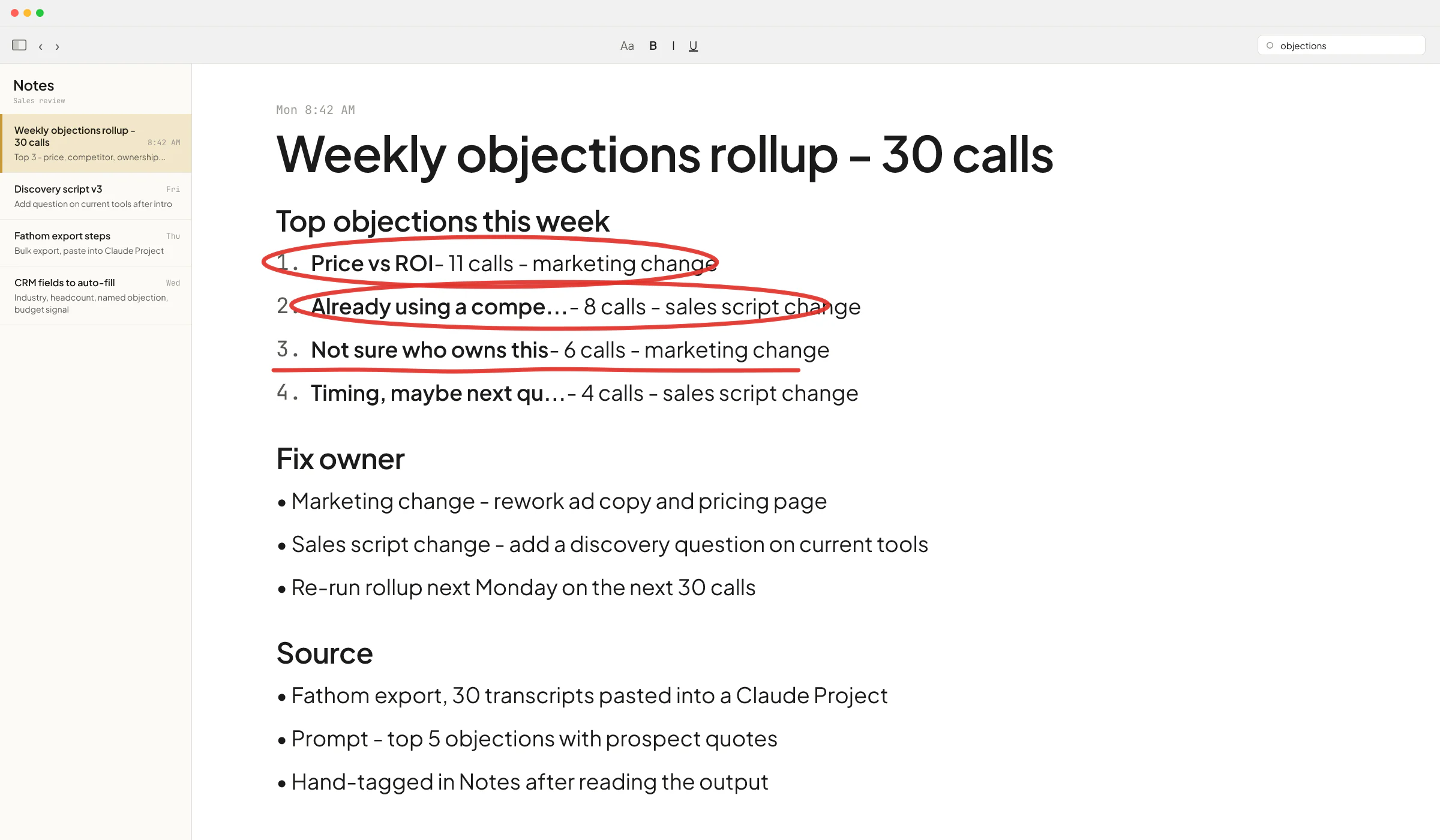
- Ask: "What are the top 5 objections that came up across these calls? Quote the prospect for each."
You'll get something useful inside an hour. I've watched non-technical founders do this and walk away with a real list of buyer language they didn't have the day before.
Where it breaks:
- Context limits. Even with the larger context windows on newer Claude and ChatGPT models, hundreds of long discovery transcripts pasted at once is past the point where the model treats every word as equal. Quality drops on the older, less-quoted calls.
- It's a manual run. Once a week, someone exports, pastes, prompts. That someone stops doing it after three weeks.
- The output lives in a chat window. Nothing reaches your CRM, nothing reaches Slack, nothing closes the loop.
A small firm running 30-50 calls a month with one curious founder can get real value out of this pattern for a long time. It's the lowest-cost answer that exists, and it should be the first thing you try.
When the off-the-shelf stack stops being enough
You'll know you're past the threshold when one or more of these are true:
- You want a weekly report that lands in Slack on its own, every Monday.
- You want CRM fields filled in automatically from what the prospect said - industry, headcount, current tools, named objection.
- You want to compare what reps say to a script and flag drift.
- You're processing more calls per month than the team can review by hand.
- You need the analysis tied to data the call tool doesn't have - deal size, close outcome, ARR, churn signal.
That last one is what pushed Sellify AI - the startup where I spent 2 years as an AI engineer - past the off-the-shelf layer. We were running CRM-integrated AI sales conversations for pest control companies at PCT 100 scale. Ivan Nikolaichuk, the company's technical co-founder, wrote on my LinkedIn recommendations page that I'd worked with the team for almost 2 years and handled complex engineering tasks independently. The HomeTeam case study Sellify published shows the punchline - HomeTeam Pest Defense generated over $1M of new mosquito revenue in a single campaign month, tied directly to the analysis of what existing customers were saying when AI reached out to them. None of that lives inside Fathom.
What custom sales call analysis actually looks like
You don't need a six-month build. You need a pipeline that does roughly this:
- A call ends in Zoom / Fathom / Otter / Gong. The transcript exists.
- A trigger (webhook, scheduled pull, Make or n8n flow) pulls the new transcript into your system.
- An LLM extracts structured fields - objections, competitor mentions, budget signals, deal stage, named tools the prospect uses - based on a schema you define.
- The structured output writes into your CRM, a Google Sheet, or a Notion database.
- A second job runs weekly, pulls the last N calls' structured data, asks the LLM to roll up patterns, and posts to Slack or emails the founder.
That's the whole architecture. The harder pieces are steps 3 and 5 - the schema you design and the prompts you write. If you change a schema field and the past three months of analysis is stuck in the old shape, that hurts.
A note on cost. The LLM bill for analyzing a few hundred calls a month is small, because transcripts are text and small models handle structured extraction well. The real cost is in design and in the boring parts - error handling when the transcript is empty, when the call was 2 minutes long, when the audio was bad and the transcript is half garbage. This is the kind of work I described in my Upwork profile when I walked through pulling a recruitment client's job-monitoring pipeline off reasoning models onto small ones - cut latency by an order of magnitude without losing meaningful quality, and the bill went down too.
If you want a primer on which automation layer to pick for the plumbing parts, I wrote that up in n8n vs Make for small B2B firms.
Confidentiality - the part everyone skips
Sales calls are sensitive. People say revenue numbers, they name competitors, they air budget pain. If you're a B2B firm handling NDA-covered client work, the question is which plan keeps you safe.
The short answer for OpenAI - Business, Team, Enterprise, and the API don't use your data for training by default, and OpenAI restates this on its Enterprise privacy page. Anthropic's commercial terms say the same for Claude's paid API and team tiers. Free ChatGPT and free Claude do not have those defaults. If a rep is pasting a transcript into their personal ChatGPT, you have a leak.
The fix is mechanical. Put the firm on a paid plan with the training opt-out baked in. Don't use consumer accounts for client data. If you build a custom pipeline, use the API (not the consumer UI), and keep a per-call audit log of what got sent where.
I went deeper on this in Is ChatGPT safe for confidential information? - worth a skim before you hand transcripts to anyone.
A decision rule, in one paragraph
Use Fathom or Otter for per-call summaries. If you have under ~50 calls a month, try a weekly Claude Project rollup before paying for anything else - it costs you an hour and might be all you need. Move to a custom pipeline when you want analysis writing back to your CRM, weekly insight reports landing in Slack on autopilot, or call data crossed with deal outcomes. Gong is worth it once you have a dedicated sales ops headcount and a budget that justifies it; before that, the price is hard to defend for a 5-20 person firm.
What to do this week
If you've never tried the Claude rollup, do that one. Export 20 recent calls, paste them in, ask for the top 5 objections with quotes. You'll learn whether the patterns you assume are in your calls are really there.
If you've already tried that and want the next layer - the weekly Slack report, the CRM auto-fill, the cross-call dashboard - book a call here: cal.com/vlad-brakalo/30min. Bring your current setup and a rough call volume, and we'll figure out whether the next step is one more prompt or a real pipeline.
FAQ
What's the best AI tool to analyze sales calls in 2026?
There isn't one best tool. For per-call summaries, Fathom and Otter are the cheapest good options and Gong is the enterprise one. For cross-call pattern analysis on a small budget, paste transcripts into a Claude Project. For automated weekly reports tied to your CRM, you need a custom pipeline. The right answer depends on call volume, what you want done with the output, and how confidential the calls are.
Can ChatGPT or Claude analyze a folder of call transcripts directly?
Yes, with limits. Both let you upload files into a Project (Claude) or a Custom GPT (ChatGPT) and ask questions across them. The limit is total context - long transcripts at scale stretch what the model can hold and reason over in one go. For a few dozen calls it works well. For hundreds, you want a pipeline that processes calls one at a time and stores the structured output.
Is it safe to feed sales call transcripts into ChatGPT?
On free ChatGPT, no - the consumer plan is not built for client-confidential data. On ChatGPT Business, Team, Enterprise, or the API, OpenAI states it does not use your data for training by default. The same rule applies to Anthropic's paid commercial tiers for Claude. The mechanical fix is to move the firm off consumer accounts before any transcript gets pasted.
How much does it cost to build a custom sales call analysis pipeline?
Two costs. The LLM bill itself is small for a few hundred calls a month, because structured extraction runs on cheap, small models. The build cost is engineering time, and that scales with the integrations you want (CRM write-back, Slack reports, comparison to deal outcomes). I scope these per firm based on call volume and what's already in your stack.
Do I need Gong for this?
Gong is excellent if you have a sales org big enough to use what it does. For a 5-20 person B2B firm, the price is usually hard to justify against the combination of Fathom for per-call summaries plus a custom rollup for cross-call analysis. The crossover happens around the point where you have a dedicated sales ops person and dozens of reps to coach.
Can AI auto-fill my CRM from sales calls?
Yes, this is one of the most common things I build. A transcript is parsed for structured fields you define (industry, headcount, named objections, current tools, competitor mentions, budget signal), and the fields write back to your CRM through its API. The work is in the schema and the prompts, not the model. Tools like Make or n8n handle the plumbing for smaller firms; production volume usually needs custom code.