Your team is already using AI. Someone drafts a client email in ChatGPT. Someone else runs Fathom on every discovery call. The bookkeeper feeds a PDF invoice into Copilot. Nobody sat down and decided any of this - it just happened.
That's when AI confidentiality issues start. Usually there is no dramatic breach - just a hundred small habits nobody wrote down.
What "AI confidentiality issue" actually means
There are three separate risks people mix up:
- The AI vendor trains on your data. Your client's proposal ends up shaping the next model version. This is the fear that spreads on Reddit and shows up in policy templates.
- A person at the vendor sees your data. Support reviews a conversation. An engineer looks at flagged content. A subprocessor logs the request.
- Your team ships data somewhere it doesn't belong. Someone pastes a signed NDA into a personal ChatGPT account. A meeting bot joins a call it wasn't invited to. A shared Notion workspace has AI turned on for everyone.
Risk 1 is mostly solved on paid business plans. Risk 2 is a contract question. Risk 3 is the one that gets small firms in trouble, and it's the one no vendor policy fixes for you.
The Samsung case in 2023 is the textbook example. Within 20 days of allowing ChatGPT internally, engineers pasted proprietary source code and confidential meeting notes into the consumer product, and Samsung banned the tool company-wide. That wasn't OpenAI's fault. It was a Risk 3 problem with no process behind it.
Consumer vs business plans - the line that matters most
The single biggest confidentiality lever a small firm has is which plan the team is on.
On consumer ChatGPT (free or Plus), your prompts can be used to improve models unless you turn training off in settings. On ChatGPT Business, Enterprise, and the API, inputs and outputs are excluded from training by default, and OpenAI says the workspace data stays yours. Same story on Anthropic's side: Anthropic may not train models on customer content from paid services.
If your team touches any client data - drafts, transcripts, spreadsheets - the whole team belongs on a business plan, and personal Plus accounts staff signed up for and expense need to go away.
If you want the deeper breakdown of what's safe on which ChatGPT tier, I wrote a longer piece on whether ChatGPT is safe for confidential information and the pricing tradeoffs that go with it.
The tools your team is already using, ranked by risk
Here's the stack most small B2B firms have without noticing.
ChatGPT / Claude - low risk on business plans, high on personal
Fine on Team, Business, or Enterprise plans. Not fine on personal accounts staff signed up for and forgot about. Paying for the workspace and blocking access to the consumer version at your identity provider matters more than any written policy.
Microsoft 365 Copilot - low risk on the model, high risk on permissions
Copilot inherits your existing Microsoft permissions. If your SharePoint permissions are a mess, Copilot will happily surface confidential documents to the wrong people. Audit access before rolling it out.
Google Workspace / Gemini - fine if the admin locked it down
Same shape as Copilot. Fine on business tiers, dangerous if someone on the team is using their personal Gmail for client work.
AI notetakers (Fathom, Otter, Fireflies, Read) - medium risk, big blast radius
This is the category where I see the most muddled thinking. The notetaker company usually promises not to train on your calls. Fathom's AI subprocessors are contractually prohibited from training on customer data, though Fathom itself uses de-identified data to improve its own models unless you opt out.
The bigger problem isn't training. A meeting bot joins every call, records it, transcribes it, stores it in the cloud, and often auto-shares summaries in Slack. If a prospect drops NDA-covered numbers into a discovery call, you now have a permanent transcript of that in a third-party system. Most clients never signed anything that permits this.
If you're weighing which notetaker to standardize on, I wrote a Fathom vs Otter comparison for small B2B firms with the plan-by-plan details.
Notion AI / Monday AI / QuickBooks AI - low training risk, high permissions risk
If it lives inside a tool you already pay for, it usually inherits that tool's data policy. The failure mode is that AI features get flipped on for the whole workspace, and now anyone can ask "summarize the CEO's private page" and find out it exists.
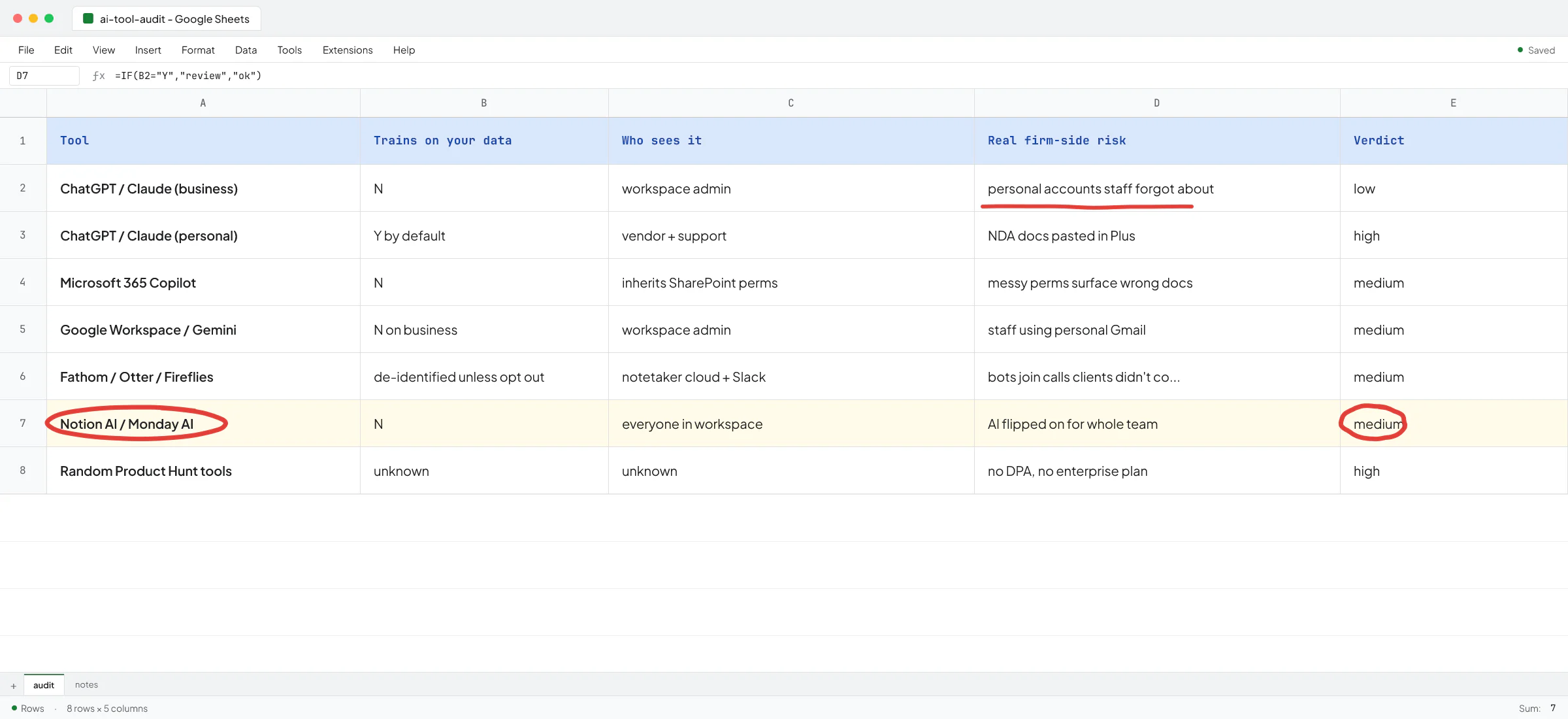
Random AI tools your team found on Product Hunt - unknown, treat as high
The scariest ones I see in practice: browser extensions that "help you write emails," Chrome plugins that summarize LinkedIn profiles, and one-off SaaS an intern signed up for with a client email. These often have no enterprise plan, no data processing agreement, and no clear policy on what happens to your text.
The four leaks that happen at small firms
Vendors publish policy pages that make it sound like the risk is theirs to manage. The leaks I see in real firms almost never come from the vendor. They come from these four patterns:
- Personal accounts for client work. Someone on Plus, pasting an NDA'd doc. Make the paid workspace the only option.
- Meeting bots joining calls the client didn't consent to. Fathom or Otter auto-joins from a calendar invite the client didn't know they were sending. Turn off auto-record and ask on the call.
- AI summaries auto-posted to shared channels. A sales rep's Fathom summary lands in a #general Slack channel that includes contractors. Fix at the destination, not at the tool.
- Files pasted into random web tools. "Free PDF summarizer" a bookkeeper found on Google. Give them the one paid tool that does the job so they stop looking.
Three of the four are fixed by process and defaults, and only one is about picking a different vendor.
When a subscription is enough, and when it isn't
Some client work fits neatly inside a paid ChatGPT or Copilot workspace. Some doesn't.
At Sellify AI - a pest control AI startup where I worked for two years - we couldn't just paste customer conversations into a chat window. The system was calling homeowners at scale, selling mosquito treatments on behalf of large pest control companies, and the CRM contained tens of thousands of customer records. There was no version of that job that lived inside a Team plan. The technical co-founder Ivan Nikolaichuk, who led architecture, wrote this in his LinkedIn recommendation of my work: "I've worked with Vlad for almost 2 years on Sellify AI and he did an outstanding job."
Signs you've crossed the line where a subscription stops being the answer:
- Your workflow involves 3+ tools and you're gluing them together with copy-paste.
- You handle regulated data (health, financial, legal) that shouldn't leave your systems.
- The AI needs to write back into your CRM, accounting system, or ticketing tool.
- You have a specific customer promise about what happens to their data.
At that point, the right answer is often a small internal tool that calls the AI API directly, keeps data inside your own storage, and never exposes it to a shared workspace. That's the pattern behind the team-of-agents rebuild I did for a staffing-agency SaaS client - the sensitive matching logic runs inside the client's own infrastructure, and no vendor sees a labeled dataset.
For a recruitment AI startup I work with, I built an end-to-end job-monitoring agent that reads job portals, filters against a recruiter's preferences, and pushes matches into their Salesforce. All the client-sensitive filtering happens inside the client's own systems. The AI vendor sees a query, and never the recruiter's private preference list.
A practical setup that stops most leaks
You don't need a 40-page policy. You need four things:
- One paid workspace per AI vendor (ChatGPT Business, Claude Team, or equivalent), with personal accounts blocked for work.
- One notetaker, with auto-join off and a rule that recording gets asked on the call.
- A named person (usually the owner in a firm under 20 people) who signs off before any new AI tool gets added.
- A one-page list of what data goes where - which tool is allowed to see client names, financials, contracts, health data. Written in plain English so everyone on the team can quote it from memory.
If you can nod at all four, you're ahead of most small firms I talk to. If you can't, that's the first project, and it usually takes a couple of afternoons.
The service question, said plainly
At some point most small B2B owners hit a wall where the audit reveals more than a subscription can fix. There's real client work that needs to stay inside their own systems. That's where I get hired - I sit down with the owner, map what's already happening, and figure out what needs to be a rule, what needs to be a permission change, and what needs a small custom build.
If you want that conversation, book a slot on my calendar. Tell me what your team is doing with AI, and I'll tell you where the real leaks are and what to do about them.
Not legal advice - if you're in a regulated industry (health, law, financial), loop in your compliance counsel too.
FAQ
Is ChatGPT safe for confidential business information?
On personal Free or Plus, your inputs can be used to train models unless you turn training off in settings, and there's no admin control. On ChatGPT Business, Enterprise, or the API, inputs and outputs are excluded from training by default. For client work, put the whole team on the business plan.
Do AI notetakers like Fathom and Otter train on my calls?
Fathom's contracts prohibit OpenAI, Anthropic, and Google from training on your customer data, and Otter has similar terms. Fathom does use de-identified customer data to improve its own models unless you opt out. The bigger risk is that recordings and transcripts sit in a third-party system your clients never consented to.
What about Microsoft Copilot and Google Workspace AI?
Both are safe on business plans by default. The failure mode is inherited permissions. Copilot surfaces whatever the user already has SharePoint access to, so a messy permissions setup becomes a messy AI setup. Audit access before turning it on.
Can my team use the free version of ChatGPT for client work?
Not for anything under NDA. Free-tier prompts can be used to train models by default. Even with training disabled, there's no admin visibility, no data processing agreement, and no way to prove to a client where their information went.
When should a small firm build a custom AI tool instead of using a subscription?
When you handle regulated data that shouldn't leave your systems, when your workflow needs the AI to write back into your CRM or accounting tool, or when you're gluing 3+ tools together with copy-paste. At that point a small internal build usually pays back within a few months, and it keeps client data inside your own storage.
What's the fastest way to reduce AI confidentiality risk this week?
Cancel personal Plus subscriptions used for work, put everyone on a single paid business plan, turn off auto-join on your notetaker, and write a one-page list of what data is allowed in which tool. That handles most of the real risk without hiring anyone.